
I have enhanced my EPUB converter for reading complex English literary texts. In the previous version, I used to send chapters to ChatGPT, asking it to translate (in brackets) the difficult words. I was asked in the comments how the difficult words are determined. In general, after having read the first quarter of the book this way, I realized that not all difficult words are considered difficult by ChatGPT, including some obviously complex ones, which it doesn’t translate.
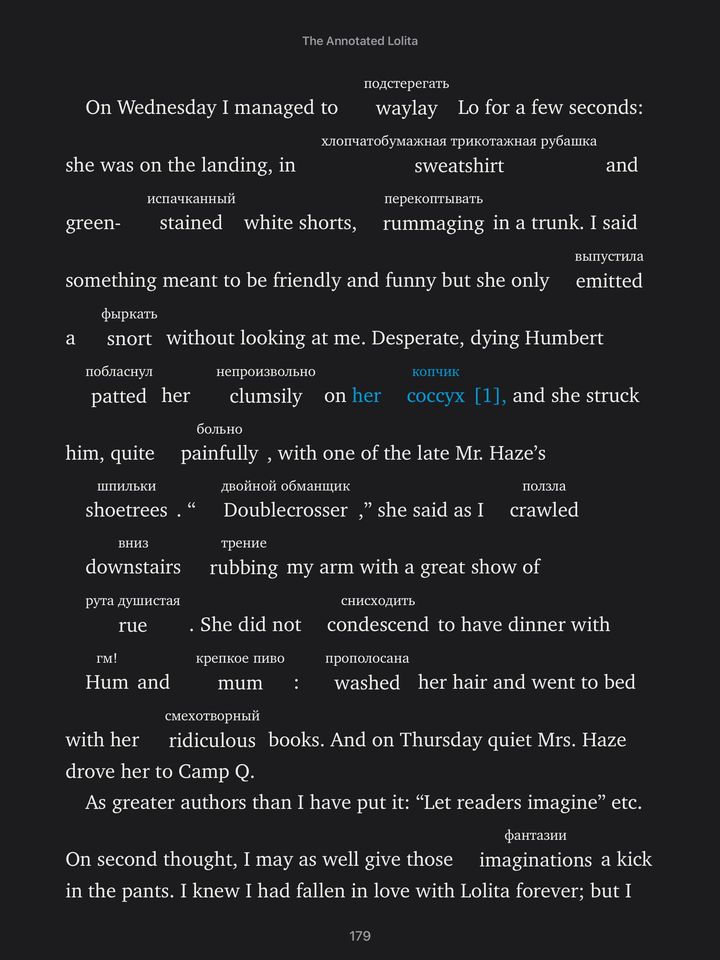
Ultimately, I made a new version. Visually, it differs in that translations now appear above words. This arrangement does not break the sentences into pieces like when the translation was in brackets. But that’s not all.
I have changed the method for identifying “difficult words requiring translation.” It now operates with a list of 300,000 words based on their frequency of use in the English language. The first 3.5% of this frequency-sorted list (determined empirically) are now considered simple and do not require translation. The rest do. Technically, I also have a difficulty group for each word rated 1-30, but unfortunately, I cannot highlight them in colors in Books.
Then, the word needs to be translated into Russian somehow. To avoid using LLM for this, I found Müller’s dictionary with 55,954 words. The word that needs translation is put into its normal form and searched in the dictionary. If found, the first definition from the dictionary is taken. Unfortunately, the first one is not always correct, but it works most of the time. If Müller’s dictionary does not have it, the system moves to LLM. Here, I have two implementations – using local LLAMA3 and using OpenAI. The local one is obviously slower and the translation quality worse, but it is free. There is a separate system that checks what LLAMA3 has translated and makes it redo it if it returns something inappropriate (e.g., too long or containing special characters).
In addition, for LLM-based translations, the system is provided with more context — the sentence that contains the word to be translated. This makes the translation closer to the text. There are still minor flaws, but they are generally livable.
However, even with all this, the translation via LLM is of low-quality. Ideally, additional dictionaries should be connected so that if a word is not found in Müller’s, other dictionaries are tried, and only then, if still not found, would we use LLM. I’ve already acquired one and will be experimenting.
If the system tags too many obvious words, I can adjust a coefficient, and the frequency group from which words are not translated will be larger, and surely these obvious words will stop being translated. Of course, there are always “rare” words that do not need to be translated because their translation is obvious. But it’s not easy to teach the script to recognize such instances; it’s easier to just leave it as it rarely happens.
Next, the translation is displayed above the word. For Books, this also involves some complex maneuvers, but it eventually worked on both iPad and laptop. Unfortunately, for the phone, it needs to be done slightly differently, so the book version for the phone and the version for iPad/computer will be different. But this doesn’t really bother me much, what’s the difference.


 Hi, I'm Rauf Aliev.